Showing posts with label Google. Show all posts

Saturday, September 5, 2009

Google's dead-simple home page design is patented

Who would have thought...
Do you know that simple yet boring Google search home page? Of course you do! (If not, just "google"-it-up ~LOL~) Well, apparently Google think it is more than what meets the eye and patented the design.

It has been five years since Google first submitted the patent design of its search result along with the home page on 2004 back then, the U.S. Patent and Trademark Office awarded the patent of what Google calls it as: "Graphical user interface for a display screen of a communications terminal"
Wow! Guess all of patents in the world always have long names for every little-short things...

So beware all of you web designers, if you're planning or already use Google's famous search home page design. Because like Ryan Tate from Valleywag said it: "In other words, ... Google owns the idea of having a giant search box in the middle of the page, with two big buttons underneath and several small links nearby" ;-p

Read the whole story and full pictures of the patent at the link above.

Wednesday, December 31, 2008

Gmail now suggests users to dump IE

It's no secret to the geek society that Microsoft's Internet Explorer (IE) is a slow-poke web browser compared to many other competitors out there in the market, heck I even experienced few crashes when I use it to open heavy loaded Flash web pages. But apparently it has become no secret anymore for Google to begin suggesting its Gmail users to dump IE for its own Chrome web browser or Firefox.

Gregg Keizer from Computerworld is reporting; when users of IE6 reach Gmail.com, a "Get faster Gmail" message appears in the web-based service's menu bar. The message, in turn, links to a page on Google's web site that touts Chrome and Firefox 3 as being "twice as fast" at running Gmail.

Google currently lists IE7, Firefox 2.0 and later releases, Chrome and Safari as the only supported browsers for Gmail . Others, including Opera and older editions of IE, Firefox and Safari, can be used to access the e-mail service but aren't able to handle some of its features.

Saturday, December 20, 2008

Google optimized search result pages for Android & iPhone

Wow, Google is on fire this week. Those smart guys at Google's Software Team are pushing the envelope every now and then, where there have been some improvements before this one, click on this link to see all of Google updates for this weekend.

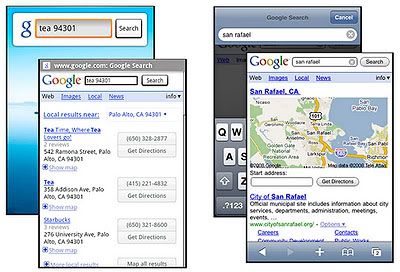
And now Google Mobile Team has optimized the search result pages for Android and iPhone/iPod Touch (with software v2.0 or above), all of Google search options for Android and iPhone lead to results that load faster and are formatted to fit the screen so you don't have to zoom or scroll side-to-side. They've also added touchscreen-friendly buttons and expandable maps for local business results.

The optimized search results pages are currently only available in U.S. English language. And If you prefer, you can always view desktop search result pages by selecting the "Classic" link at the bottom of any page.

Friday, December 19, 2008

Google Enterprise Appliance server now has cross-translation option

Google's offering of total solution for organizations of all sizes: Google Search Appliance is now armed with new cross-language and search ability in the box.

"Many of our enterprise search customers have dozens of offices all over the world with tens of millions documents indexed in a host of different languages," said Cyrus Mistry, Google's enterprise product manager, in a blog post (via Business Tech). "Cross-Language Enterprise Search instantly translates your Google Search Appliance query from one language to one or more other languages using Google's best-in-class translation engine." Existing customers can try the feature by downloading it through Google Enterprise Labs.

Google is showing aggressive moves to penetrate enterprise and corporate businesses, and also targeting middle business as well while adding more features every day. No wonder Microsoft is worry...

See Big Apple in almost real 3D rendered photos from Google Earth

I've always wanted to see New York City, it is said to be the center of world's civilization. And as time passes by, I guess I've missed my chance...

But with this feature added into Google Earth, which is able to add thousands of textures to flesh out virtually every buildings in Manhattan, I just got a second chance to see the Big Apple with my own eyes. Heck, I can even visit NYC while wearing my pajamas. ~LOL~

The picture you see above is not a real photo, it's actually a photo-realistic 3D model from many photos of New York contributed by community members. Even so, I must agree with Mark Wilson from Gizmodo: it's simply breathtaking!

I wonder how this will look like in mobile devices with supreme wide screen such as iPhone, G1 Android, HTC Touch HD, or BlackBerry Storm. If Google can deliver more rendered photos of cities around the world, and paired it with Google Maps, then we can seriously consider to ditch GPS devices.

Sources are from Google Earth Blog, via Gizmodo, via Lifehacker.

Wednesday, December 17, 2008

Google gave Andoid an arm extension to edit Maps

I wouldn't be surprised at all if Google is giving all of its attention and resources to build new apps for its one and only mobile child; Android.

But what really surprised me is, that this new My Maps Editor app for Android is created in just four months, using only of Brian Cornell's (the Google Software Engineer who made this app) 20% time and with a little help from the 20% time of his coworkers. This really demonstrating the ease and power of developing on Android, Brian says in Google Mobile blog.

With this app, Android users can edit Google Maps directly from their handsets such as T-Mobile's G1 or the upcoming Kogan Agora, and perhaps even Lenovo's OPhone as well.

My Maps Editor allows users to have full editing functionality like markers, lines, shapes, create, edit, share, and view personalized maps; plus the ability to mark your location using GPS or attach a photo directly from your phone. Your maps are automatically synchronized with your My Maps on the web.

Brian gives three examples of using his app creation for holidays, one example is for keep track of your travels. You can map out your travel plans and take them with you wherever you go. Add markers while you travel to mark interesting places, and take lots of pictures and attach them to the markers. Then when you get back, you can share the map with your friends and show everyone what your did on your vacation with a map and pictures to help them really visualize the trip.

My Maps Editor app is already available in Android Market, go get it tiger. Sources are from Google Mobile blog, via AndroidGuys.

And while on the desktop version, Google also has put in a new feature into Google Maps: YouTube videos add-on. According to Josh Lowensohn from Webware; by choosing the video layer from the "more" menu, which also houses photos and Wikipedia entries, users can now browse and watch YouTube videos that have been geotagged. The interface has also been slimmed down to exclude the video information and view count, letting the player fit in a smaller amount of space.

Now if just this YouTube add-on also for Android, the world seems like whole again... until we begin to want for more features. ~LOL~

Gmail got turn an email into Google Doc feature

Those brilliant bright guys at Gmail Labs don't seem to have enough rest these days, they just keep on churning up new features for Gmail every now and then.

Just few days ago we received SMS text messaging for chat feature in Gmail (which our own fellow Associate Writer Lauren Blake is loving it), and now we got an experimental feature in Gmail that turn an email into a Google doc with one simple click, "Create a document" converts an email into a Google Docs document.

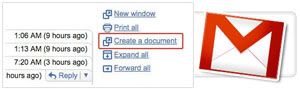
Jeremie Lenfant-Engelmann from Google Software Engineer announce the new experimental feature at Gmail Blog: No more copying and pasting the text from your email -- just open the message you wish to convert, click the "Create a document" link on the right side of the page, and voila, you have a brand new document which you can then modify and share!

You can easily open up a blank doc by hitting g and then w (just make sure you have keyboard shortcuts on). To turn on this feature, go to the Gmail Labs tab under Settings, select "Enable" next to "Create a document" and hit "Save Changes" at the bottom.

Sunday, December 14, 2008

Gmail now has its own PDF viewer

Have you noticed there's been a new feature embedded into your Gmail account? It's a neat little add-on feature; which lets you to view PDF files straight from Gmail, without the needs to install PDF viewer apps first like the heavy Adobe Acrobat.

Here's the announcement from Marc Miller from Software Engineer at Gmail Team: Clicking "View" quickly opens the PDF inside your browser, complete with the graphics and formatting you expect to see in a PDF.

If you want, you can still view in plain HTML from a link at the top of the new viewer.

And if you want to download, save, and view your PDFs later while offline using client software, you can still do that by hitting the "Download" link.

The cloud computing experience just got a little better...

Friday, December 12, 2008

Fully polished Google Chrome has left the Beta label

Just yesterday on December 11th, at exactly 10:00AM sharp; Google made an announcement in its official blog: We're excited to announce that with today's fifteenth release we are taking off the "beta" label (from Google Chrome)!

The first version released of open source web browser from Google is ready to be downloaded directly at its website.

Sundar Pichai, vice president of product development, told Rafe Needleman from Webware that this release of Chrome will have "tons and tons of bug fixes," especially around audio and video playback, which should now be "more stable."

And according to Google's official statement, they have made great progress on some areas which include:

  • Better stability and performance of plug-ins (particularly video). Video and audio glitches were among the most common bugs fixed during the beta period.
  • Even more speed. Since the first beta, the V8 JavaScript engine runs 1.4 times faster on the SunSpider benchmark and 1.5 times faster on the V8 benchmark — and there is more speed to come.
  • Bookmark manager and privacy controls. It's now easier to switch between another browser and Google Chrome with the bookmark import and export features, and we added a new simple way to manage large numbers of bookmarks, too. We also wanted to make it even easier for you to control your browsing data, so all of the features in Google Chrome which affect user privacy are now grouped in one place with detailed explanations for each one.
  • Better security. Google Chrome's unique sandbox technology creates an additional layer of defense against harmful software, while the Safe Browsing feature provides protection against phishing and malware attacks for many browser users.

Google also planning to develop Chrome in extensions platform along with support for Mac and Linux. And for those who already have Chrome installed in their computers, the update system ensures that you get the latest bug fixes and security patches, so you will get the newest version automatically in the next few days.

Thursday, December 11, 2008

SMS text messaging for chat in Gmail is now for real

Whatever happened back then in November 2, when the Gmail Labs Team pulled off the SMS text messaging for chat feature in Gmail, it took them more than the promised 2 weeks to solve the "snags"/bugs in it.

Leo Dirac, Product Manager at Google said in Gmail Blog: "A few weeks back, we ran into a few snags when we first started rolling this out, but starting today you can turn on text messaging for chat. Just click on Settings, and go to the Labs tab. Scroll down until you see 'Text Messaging (SMS) in Chat' and select Enable and Save Changes."

But unfortunately, this new text messaging in chat feature is only available for mobile phones in the states: "We're just trying it out for cell phones in the United States right now, but you can send texts to your friends with US phone numbers from anywhere in the world."

On the receiving end, when you get a text message from Gmail on your phone, it will come from a number in the 406 area code. You can reply to this text on your phone just like you'd reply to any other text. The reply gets routed back to our Gmail servers and shows up in your friend's Gmail chat window.

Sources are from Gmail Blog, via Lifehacker & Webware.

Tuesday, December 2, 2008

Mumbai terrorists used Google Earth & BlackBerry for their attacks

This is indeed a very dishearten news to be heard of, but according to various reports from news channels; mobile technologies are being used by terrorists to plan and execute their attacks.

You must have heard about the most recent and shocking terrorist attack which happened at Taj Mahal hotel in Mumbai, India. But what you might not have heard yet is the findings found after the attacks, as reported by TG Daily:

"Mumbai terrorists reportedly were instructed to memorize satellite imagery of Mumbai streets displayed in Google Earth so that they could find their targets. Indian officials in charge of investigation discovered this fact during the questioning of the only captured suspect. The police also learned that the terrorists relied on satellite phones and GPS equipment to navigate to their targets."

And Gizmodo also had reported previously: "Indian commandos were not only surprised to find the devices (BlackBerries) in the terrorists' rucksacks, but that they used the internet to look beyond local Indian media for information, watching the global reaction in real-time as well."

It's very sad to know when the good technologies made are being used as terrorists' tools to hurt innocent people, I'm speechless to respond on the news... Let's pray that there'll be no more terrorist attacks allowed to happen again in the future, and hopefully technologies can help to thwart such acts from happening.

Monday, November 24, 2008

Google plans to preinstall Chrome in new computers

Let me start by asking this to you first: "Have you tried Chrome yet?"

Why I asked you that question? Well, that's because from 6 people I asked about Chrome, only one said he knew about Google's web browser. But even that particular person hasn't even tried Chrome yet till now. And those 6 people I've asked, are not geeks nor bloggers, they're just ordinary office workers & housewives. ;-p

That little survey of mine maybe doesn't exactly tell how the search giant's new web browser is struggling to gain popularity among average computer users, but you'll probably will more believe it if the survey is a market data from online research firm Net Applications on web browsers market share:
  • Internet Explorer at 71.27%
  • Mozilla's Firefox at 19.97%
  • Safari at 6.57%
  • Opera at 0.75%
  • Chrome now at the bottom with only 0.74%

Although the reality of Chrome market share is not looking so good, but Google sees it with a more positive point of view. On an interview with Times Online, Google Vice President of Product Management Sundar Pichai revealed that Chrome will be ready to come out of “beta” testing by January next year, and that the search giant was aiming to make Chrome available for Mac & Linux computers in the first half of 2009.

Further more, Pichai also explained the main reason on why Google seems to be holding back to promote Chrome is because of timing tactic. Pichai said: “We will throw our weight behind it. We’ve been conservative because its still in beta, but once we get it out of beta we will work hard at getting the word out, promoting to users, and marketing will be a part of that.”

Pichai then pointed out Google's next biggest plan to make Chrome as a serious contender against IE: “We could work with an OEM (Original Equipment Manufacturer) and have them ship computers with Chrome pre-installed.” Google is following the sleazy tactic which Microsoft has used all these time to make IE as the industry standard; preinstalled it inside Windows OS that comes along with new PCs.

If Google can really pull off that trick for Chrome and beat Microsoft's IE, then it would be great for every end users like you and me; because the balance of power finally get to be restored. The last thing we need is another huge evil company to dominate our mobile world...

And for one last thing, I'm actually surprised to hear that Google has finally decided to make one of its many great Beta products to become non-Beta, in other words a fully working and official software. ;-p

Sources are from:

Wednesday, November 5, 2008

Google will benefit the most from the U.S. Presidential Election?

I see many posts lately at PalmAddict are about casting vote in the Presidential Election 2008, this is a solid proof that our biggest family members are from U.S. soil.

Although I must agree with Sammy; we shouldn't mix politics into our happy mobile-oriented community, but it is undeniable that there's an indirect relationship between politic and technology/IT.

Like for an instance, there's this interesting article written by Sascha Segan from PC Mag titled: "Google Wins the Presidential Election (So Does Obama)". The title of the article itself will capture your attention, so it did to me. ;-)

What does he mean by: Google actually won this election. Every way you slice Obama's tech policy, it is good news for Google? Sascha Segan then presents a quick fact: On Obama's Web site, he actually mentions Google as a model, pledging to create "a Google-like search engine that will allow ordinary Americans to track federal grants, contracts, earmarks, and loans online."

And it might not just the new President Elec Obama who will effect how technology turns into when he finally take on the the helm at White House, his Vice President will also probably make his own move: On the other hand, VP-elect Joe Biden has traditionally been friendly to the recording industry, which includes the most anti-fair-use people in the world. Watch out Torrent users, you might see some Torrent ports being throttled when Obama-Biden enter the White House.

And lastly, let's not forget how social networking sites such as Facebook & MySpace, have helped to boost Obama's popularity back then during his campaign. It was the power of mouth-to-mouth spread across the internet, which donated the high volume of Obama campaigns.

I wonder if Palm will also be able to create new openings with the new President Elec's policies on IT & technologies? Godspeed, and finger crossed. ;-p

[blogged with my Treo 750v]

Sunday, November 2, 2008

SMS text messaging for chat service in Gmail pulled back

Those geniuses at Google Labs never rest, they keep on making new services that are useful and easy to use, but this time they've rolled out too soon a new service in Gmail: SMS text messaging for chat.

Just a day before Gmail Labs pulled back the service, Michael Calore from Webmonkey explained how it should work: "Once the option is turned on, start typing a phone number into Chat’s search box and you’ll see the option to send an SMS. ...
When your friend’s name appears in the drop-down list of contacts, you’ll see an option to send them an SMS. You can also hover over or click on anyone in your Chat buddy list to send them an SMS. The first time you send a text message, it will appear on the person’s phone as coming from a number in the 406 area code. ...
The 406 number works both ways, so your friend can reply to you via text message. Also, your friend can save that number in their phone as belonging to you, and they can even use it to initiate new chats with you."

And then on October 31, 2008; Leo Dirac, Product Manager of Gmail Labs announced the reason behind pulling back the SMS text messaging for chat: "Then we found a glitch. When you'd try to turn it on, it wouldn't fully enable. We thought about keeping it out there -- bugs and all -- but the experience wasn't that great. So, in the spirit of Labs, we've pulled SMS chat back to fix it, and we'll get it back out to you as soon as it's ready -- probably within 2 weeks, so stay tuned."

Sources are from Gmail Blog, via Webmonkey, via Switched.

[blogged with my Treo 750v]

Saturday, October 25, 2008

Gmail Manager for Firefox

Who's got more than 2 Gmail accounts, please stand-up or raise your hand?

If you're standing up, or raised your hand spontaneously; then you're one greedy Gmail addict! ~LOL~

But I guess it's normal nowadays, if a person had more than 1-2 Gmail accounts. Aside it's free and full of great features, it has become one of the must have email account both for business & for personal use.

But maybe your reason is the same as Rick Broida's from PC World: "Hey, Google makes the rules, not me. Gmail accounts are free, and there's no limit on how many a single person can have." ;-p

Rick has found a better way to manage those many Gmail accounts that you have, it is called Gmail Manager. And right now, it's only for Firefox web browser. Here's the list of what the Gmail Manager can do for you:
  • Manage multiple Gmail accounts
  • Receive new mail notifications
  • Support for Gmail hosted accounts
  • Ability to import/export account preferences
  • Tooltip with account details and new mail snippets
  • One-click access for loading your Gmail account
  • Mailto: links detection
  • Quick mail compose for Gmail accounts
  • Customizable icon placement in the toolbar/statusbar

So, what are you waiting for? Go grab it, and then subscribe for more Gmail accounts that you've been wanting to have but affraid to burden you too much... ~LOL~

[blogged with my Treo 750v]

Funny ad: Lost in Google, found in Yahoo?

I was just browsing endlessly last night, when suddenly a small ad located on the corner of a web page caught my attention...

The first image shown is a milk package with a picture of a man on it, and with these lines: "LOST. Last seen: Searching Google for music videos. -- Missing since breakfast."

In a few seconds after I saw the first image, I was wondering what could this ad be talking about? A new Google's on-line ad? But after the next image showed up with these lines, I got it: "Don't get lost in all the links. Try Yahoo! Search." ~LOL~

When Microsoft is fighting with Apple over the PC vs. Mac ads, it seems there's another small war took place between Yahoo and Google. They're fighting over what they do best; Microsoft/Apple is in the battle for best OS, while Yahoo/Google is fighting for the best search engine.

Who do you think will win? Personally, I don't care that much. But as long as they're fighting each others, it sure is fun to watch. Right? ;-p

[blogged with my Treo 750v]

Friday, October 24, 2008

Gmail for mobile 2.0 is ready for you

Google for mobile team has just announced yesterday, that there's a new version of Gmail for mobile (v2.0) app for J2ME-supported and BlackBerry phones.

They have been working hard to bring a better Gmail for mobile app, and here's the list of the new improvements:
  • Overall performance improvement: You should experience significant raw speed improvement, smoother scrolling, and no freezing.
  • Multiple accounts management: If you have both a Gmail and Google Apps email account, you can easily switch between them quickly. You will no longer have to use two different mobile apps to access personal and work emails.
  • Multiple mobile email drafts: You can save multiple email drafts in your mobile phone, so that you can pick and choose what you would like to send later.
  • Powerful shortcut keys: If you have a QWERTY phone, you can use shortcut keys. Hit 'z' to undo, 'k' to go to a newer conversation, and 'j' to go to an older conversation. See Menu/Help in the app for more shortcuts.
  • Basic offline support: Can't get a signal? Not a problem. You can compose and read your most recent emails even when there is no signal. Also, any outgoing messages will be saved in the outbox on your phone and sent automatically when you're back in coverage.

To get Gmail for mobile and install it directly into your mobile phone, go to this link or type this on your web browser address: m.google.com/mail. Don't forget to watch the video demo below.

Unfortunately, the new app can't run natively on Treo 750 & Pro; which use Windows Mobile. You'll need to install 3rd party Java platform for mobile devices, or known as J2ME. Here's a good FAQ on what it is, why your WinMob handsets need it, and where you can get it. Good luck!

[blogged with my Treo 750v]

Sunday, October 5, 2008

Google Street View coming to Singapore

An eagle-eyed CNET Asia reader named Andrew took a picture of a silver Opel Astra complete with cameras doubling its height and the Google logo pasted on the side door. This was spotted at the junction between Dorset Road and Kampong Java Road in Singapore.

The notorious, the bitter-sweet deal part of Google Maps; the
Street View is indeed a love-hate relation when put in use. Many pedestrians are often feeling uncomfortable when caught by Google's Street View car camera, like what CNet Asia reported:

"... men have been caught entering places like adult book stores, while others have been captured while inside their own private property. To address these concerns, Google will be blurring faces and license plate numbers before uploading the images." ~LOL~

So, Singaporean residents; prepare yourselves from now on. You're being punk'd... errr, I mean you're being watched. ;-p

[blogged with my Treo 750v]

Sunday, September 28, 2008

G1 Android is still offering few Beta apps?

I'm as surprised as you are, when I first read about this great insight by Royal Pingdom's blog, and then I realized how true it is: 22 of Google's products are still in Beta version! And that's not what really shook me, I even forgotten that the Gmail I've been using since 2004 is in fact still in Beta state...

From the 49 Google products, here are the few most notable of them that still in Beta:
  • Gmail
  • Talk
  • Calendar
  • Google Docs
  • Orkut
  • Google Finance

The first three apps up there are offered in T-Mobile's G1 handset, so that would means we're still using Beta products instead of the final and stable release. The end question is why, why does Google still keep on using the Beta label? Royal Pingdom has came up with a very good answer:

"Charging money for a beta product. Google has paid options for Gmail and Docs (via Google Apps). So, how does that rhyme with these products being in beta? A beta product is by definition an unfinished product, which is usually not something you charge money for. Is any other company getting away with this? We don’t know of any."

Afterwards, Paul McNamara over at

Networkworld got an answer from Google regarding this matter:
"We have very high internal metrics our consumer products have to meet before coming out of beta. Our teams continue to work to improve these products and provide users with an even better experience. We believe beta has a different meaning when applied to applications on the Web, where people expect continual improvements in a product. On the Web, you don’t have to wait for the next version to be on the shelf or an update to become available. Improvements are rolled out as they’re developed. Rather than the packaged, stagnant software of decades past, we’re moving to a world of regular updates and constant feature refinement where applications live in the cloud."

I know I wanted to live in the 'cloud', it's good and fun. But I also wanted to have an insurance that my apps that I've bought, are legit and can be rely on when I'm using them. I surely don't want to rely on a Beta labeled apps, which lethally means: "use at your own risk!" ;-D

Although looking at video demo below on how the Google apps work on G1, I don't think anyone would mind using Beta products. ~LOL~


[blogged with my Treo 750v]

Google patents a game changing plan on mobile usage

I got to lift my hat for Google, and looks like I’m gonna do that more often in near future. Google has been pioneering new and great services over the past few years, and its latest Android handset; the T-Mobile’s G1 is just the beginning of what Google is about to offer next.

We’re all puzzled by what was Google agenda on bidding the expensive “white spectrum” in U. S. soil (the 700MHz band)? And now, things are getting more clearer, as one by one Google’s plans have been revealed.

In March 2007, Google has filed a patent for an application to the U.S. Patent and Trademark Office. That particular application, if installed into mobile phones, can find the best wireless connections for your need. Includes WiFi, aside from the obvious mobile wireless networks we already familiar with. A good example given by Nancy Gohring from
PCW Business Center article:

In one scenario described in the application, a user might have a device that is configured to use the least expensive option for connectivity at all times. When at home, the device would attach to the user's Wi-Fi network. Outside, it would switch to the cellular network.

But once outside, the device could periodically search for other available service providers, asking the service providers to bid for the chance to offer service to the customer. The device could automatically switch to the network that has the best price without interrupting a user's voice call or data connection.”

It sounds so sweet for end users, and mobile consumers. Like what Rick C. Hodgin from
TG Daily has said in his article: “Using this new method wouldn't require any changes. It would still be possible to continue using a wireless devices pretty much as is done today. In such a case, a user would setup some automatic selection critera which would engage an automatic selection algorithm.”

But it will not the same case and taste for wireless network operators, as what Nancy Gohring again pointed out to the right spot: “If Google were to try to implement such a system, mobile operators might not be interested in joining it. Operators typically try to lock customers into using only their networks, as a way to receive guaranteed regular revenue from customers. Google's plan would make it easy for end users to transfer their calls and revenue stream to other operators that might be able to offer them a better price or service.”

On the other hand, Google has its own reason and argument on keep on making this application to be implemented into mobile phones (Android platform to be precise): “Because the user controls the device, the user receives greater flexibility in deciding what applications they need or want. In addition, such generalizing of the communication channel permits more open development of devices and applications to be run on devices, because the transmissions are standardized, and any device that can format communications according to the standard will work."

Alright, all the sweet talks have made mine & yours mouth full of drool. So when can we see the application? Can we expect it to be alive in the next Android handsets? I’m afraid the answer is still vague, Google said in a statement: "We file patent applications on a variety of ideas that our employees come up with. Some of those ideas later mature into real products or services, some don't. Prospective product announcements should not necessarily be inferred from our patent applications.”

Or in other word is what Rick C. Hodgin mentioned too about this: "Bid before you use" is the model Google has patented.

[blogged with my Treo 750v]