Showing posts with label web browser. Show all posts

Saturday, December 20, 2008

IE Mobile 6 launched early as custom ROM for HTC Touch HD

Love how the free minders are taking their own actions to make IE Mobile 6 available before its official release, the main reason is probably because previously the Windows Mobile Team has confirmed that this upcoming IE Mobile 6 will only available for new WinMob devices.

Paul over at MoDaCo has built a custom ROM for the HTC Touch HD that includes IE Mobile 6; Engadget Mobile reported. Unfortunately, it's only available as a ROM update, not as an individual application installer.

I wonder if someone will be kind enough to create a custom ROM for Treo 750 with IE Mobile 6 in it too? ;-)

Tuesday, December 16, 2008

IE 8 RC1 projects dissapointment

Microsoft is trying hard to keep the pace to catch on the latest web browsers war against heavy contenders like Firefox, Safari and Chrome. Let's face it, Internet Explorer (IE) is famous not because of its features and performance, but more because of Microsoft's distributing strategy. And now Microsoft has to face the fact that IE is losing market share, big time.

Ever since that, the software giant has promised an all new IE in the next version 8. And last week, Microsoft has quietly released IE 8 RC1 to its closest partners to give it a try. TG Daily has managed to get a hold of a copy, and take it for a little spin ride. Here's the verdict:

"IE8 RC1 cannot compete with Firefox, Chrome and Opera in terms of CSS 3 compatibility. ... If the RC1 seen by us essentially represents what the IE8 final will be, then Microsoft may not be able to slow the pace of IE market share decline. ... As of now Firefox, Safari and Opera (and Chrome) play in a different league and expose IE8 as an old concept that is overrun by a new generation of browsers."

And as for us, end users, the look of IE 8 RC1 doesn't seem much different from IE7. So we basically can't get too much excited even when IE 8 is finally out, Microsoft need to learn a lot from its competitors.

Friday, November 21, 2008

IE 8 pushed back to 2009

It's not like you'll be interested in knowing that Microsoft pushes back, yet again, the release date of Internet Explorer (IE) 8 to 2009. Because, with a tight competition ahead against free web browsers such as Mozila's Firefox & Google's Chrome; we'll barely going to use IE ever again in the future.

But one thing that really concerns me is: healthy competition being stalled because of the pushed back IE 8 release date.

How so? Well, let's face it; having IE in Windows is like having a love-hate relationship. Yes, IE is not the best web browser out there if we're to talk about features, user interface & speed. But we can't argue that IE is the most used web browser in the whole wide world, almost every major web sites especially bank sites are recommending you to use IE.

Not even when Apple's Safari web browser is finally gaining more popularity these days, or when Opera web browser is standing tall in spite of struggling to grow its reputation besides in Europe, IE is still the biggest mole in the face of the competition. IE has always been the main target to be beaten, IE has always been the biggest joke amongst the others, and it always stay and installed in every new Windows OS.

So, for the sake of healthy competition in web browsers market; I hope Microsoft is not going to push back again more further IE 8 release date...

For you who wish to see a bigger sized IE 8 screenshot above, you can visit this CNet's page. And while you're at it, you can also see screenshots of Windows 7 Beta there. But I gotta warn you though, you shouldn't hope too much to see eye-candy screenshots of Windows 7 Beta; because like I've mentioned before in my previous post: "Windows 7 is just Vista with lipstick". ;-)

Friday, October 31, 2008

Radus, a media oriented web browser

Heads up people, there's a new player in the web browser competition; and its name is Radus.

Radus (read: ray-dee-us) is said to had been created as a media hub platform to let users simultaneously surf the web, search, view and share media formats (video, pictures & blogs). I suppose you can already guess Radus' main traits, only by looking at that big round playback control which pretty much looks like the iPod's famous wheel-click.

The main home page can be customized to your own liking; and features up to the minute news, entertainment, movies, blogs, etc. While on the right side panel, you'll find icon-based navigation for users to easily browse through content categories.

Undearneath the aforementioned panel, there's a search panel. It can view the results by content type: videos, blogs and photos. Afterwards, you may save the previous searches.

Lastly, on the most bottom panel, just at the right & left side of the playback control; there are integrated tool icons which enable users to share content by email or post to leading social sites.

One particular feature that I like about Radus is when it's used for reading blogs. Radus lets you add and save your own favorite RSS feeds by one click linking, and then you can customize those RSS feeds. Although only feeds with the add-to-your-home-page glyph, that can be automatically inserted and saved into your personal home page.

The ultimate experience for me would be reading blogs with it, because Radus is capable to lay 'em out in magazine style and thus eliminates scrolling. It re-format the blog's column, and adjust the blog to its own form factor. While you can leisurely stroll down the blog posts and pick the one you like to read, by take a glimpse at the blogs preview list located on the right panel.

The only drawback found now is mentioned by Ubergizmo: "I am not a fan of the way the articles from the various news and blogs sources are displayed: the source name is not visible inside Radus, you can only discover it once you clicked on the article, it takes you the original article page in another window."

Other notable features worth quick mentioning are to share the contents of media in Radus' own Community, Playlists (with cute little thumbnails), and Publish to famous social networking sites. And not to be forgotten is Radus' Widgets, which can be embedded into web page and blog. You can share videos, photos & blogs; and it automatically updates them across all social sites.

Radus uses Adobe AIR clients technology, and available for free download for Windows & Mac platform. Are you drooling already? Oh, we will drool more. Just wait till the mobile version is out, slated for release in early 2009... ;-p

I'm off now to give the new browser a try, but with the loads of work I have right now; I don't think I'll be able to fully review Radus. Sounds like a calling cue to my fellow PalmAddict Associate Writers or Editors, or even maybe the readers? *wink*

[blogged with my Treo 750v]
Monday, October 27, 2008

Cruz browser: a new fun way for cruzin' the web

I've been dying to say that, since way back then when Tom Cruise was still hanging out with the beautiful Penelope Cruz. Tabloids were often making jokes about their names, which rhyme when said but different when written. But wait, I'm here not to talk about them! ;-)

What I wanted to talk about is Cruz, the new web browser for Mac OS X. The creative mind behind Cruz is none other than Todd Ditchendorf; the developer of Fluid app. Although Cruz browser is still in its early birth, it has features that have been long sought after by avid web cruisers.

For a start; Cruz has the capability to show multiple panes altogether, enable you to do side by side web browsing at once. Secondly, Cruz is able to set up any web app you like as a sidebar. For instance, you can use FriendFeed and set it in that panel to act as an iPhone when visiting websites; this way you can view the page faster because using the stripped-down page meant for mobile browsers (if the website provides).

Another notable feature is found by Bob Rudis from theAppleBlog when he tested Cruz with his own configurations; "When you move your mouse near the top of either pane, you will see that you have full navigation controls that allow you to reset the pane back to the primary page or wander off to other sites for further investigation (i.e. do quick Google search). Cruz will also remember your settings and currently displayed sites when you quit, letting you come back right where you started."

You'll gonna have to try the Cruz browser for yourself, to see what it has in store for you. Who knows, perhaps you'll like it better than Safari browser; because Cruz uses the same source: the WebKit framework.

But what's up with the name? What is the original intention of Cruz in the tight web browser competition? And most importantly, will it stays free or will be offered with hefty price tag? Lucky for us, Giles Turnbull from Cult of Mac has contacted Todd himself and asked those intriguing questions:
  • What's up with the 'Cruz' name? --- “It’s extremely difficult to name software projects, as most of the obvious names are already taken by existing projects – and then there’s the difficulty of finding an available domain name. Finally one night, I decided to run a sort of informal poll on Twitter. After a couple of hours of hilarious suggestions from my Twitter pals, I finally got the idea for ‘Cruz’ when I asked my Mom for advice.”

  • So why make it? --- “Why Cruz? I found that many Fluid users didn’t realize that a Fluid SSB is actually a very full-featured browser, and that it’s easy to use an SSB as such. By releasing Cruz, I’m lowering the conceptual barrier to entry, and making it clear that Cruz is a capable standalone web browser."

  • What’s the purpose? --- "It’s not intended to be a money-making exercise, though. Cruz will always remain freeware. My current goal with Cruz is just to have fun. To have fun developing it, sharing it, and using it. Browsing should fun."

Bravo Todd, and I lift my hat for you. We all are wishing the best of luck in the future for your brainchild, Cruz. And for you, my dear readers; don't forget to watch the video demo that I've embedded just below this post. Enjoy!

Sources are from New York Times & Cult of Mac. #Update: added another source from theAppleBlog.


[blogged with my Treo 750v]

Sunday, September 28, 2008

IE Mobile 6 face shows up

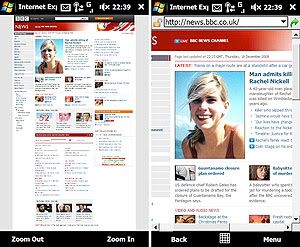
The very old Internet Explorer (IE) Mobile on our WinMob devices is going to get a nice update, it'll be updated from v4.x (first released in September 1997) into v6.x, according to the::unwired (via Gizmodo). And Microsoft has given a neat nick name for it too: 6 on 6, which is basically mean Internet Explorer Mobile 6 on Windows Mobile 6.1.

The::unwired even has tested the new IE 6 with their own blog page, it provides two different compatibility options: Mobile and Desktop. So far the theory, still according to the::unwired; in reality you can see the difference if you visit the::unwired which works with browser sniffing to serve the appropriate layout. On the left, the::unwired in Mobile mode, on the right in Desktop mode and as you can see, the Desktop mode looks quite similar to the::unwired on your PC.

Head on to
the::unwired blog page for more screenshots of IE 6.

[blogged with my Treo 750v]

Saturday, June 21, 2008

Bouncy AT&T's Pogo web browser

Remember the AT&T's attempt to enter the tough competition of web browser with its Pogo, that I told you before? Now, AT&T have spread invitations to test out Pogo at an early version.

The Pogo web browser is based on old Mozilla code, the code that Firefox 2 was built on. So with Firefox 3 is already out in the wild, I'm more hoping that AT&T will follow to release newer version of Pogo.
But even right now the 3D UI of Pogo requires these hardware specs:
  • Intel or AMD processor at least 1GHz
  • 1GB RAM of system memory
  • 512MB dedicated memory for graphics
  • Discrete or Integrated video card with 128 Mb Video RAM, DirectX 9.0c hardware compatible
  • 32-bit desktop colors

Gizmodo who got the invitation said; the link is dead. But if you wish to try it anyway, go to Pogo's site and enter this code: gYPL6vLf.

Webware also got 500 invitations that ran out pretty fast, enter the code bTHTRjv1 in the "I've been invited" section, and go through the sign-up process. You will eventually land back on the Pogo browser page again, but this time you'll have a username and password. Use those to go to the download page.

Could this be a sign that Pogo might be successful?

Tuesday, December 25, 2007

Better web surfing with Opera Mobile

Some of you might never like IE in the first place, now when you held your Treo 750 and get to know Pocket IE (PIE); you might not like it either. I must agree to some points people are making, that PIE is just too plain for experienced web surfers. Microsoft surely too slow to pick up what's new and in for the sake of their own users, either they're affraid to make mistakes or they just have became a big corporate company to slow to move. That's when Opera browser has become increasingly popular with those who're looking for alternative, Opera took the opportunity from Microsoft's slow response; and they've launched a new Opera Mobile browser v8.65 for WinMob. Long awaited features such as support for Flash Player 7 & FlashLite 2.1, tap and scroll, etc. have been available, and of course the most popular tab browsing is already a standard feature for Opera browser that even PIE hasn't have this one in WinMob 6. I've witnessed myself Opera Mobile browser is faster to open any websites, specially the ones with Flash Player & FlashLite in them. It also has the capability to open pop-up window if you click on the hyperlink or email link whenever a website provide them, where usually PIE will block these because of it's limited script strength. Another good thing is I installed Opera Mobile into the Storage Card instead of the main memory, and yet it works fine without any trouble at all. Alternatives are good for healthier competition, and in the end we can have better products to use in our palm. (blogged with my Treo 750v)